---
title: "#110: Snapshot 📸"
url: https://littlebitesofcocoa.com/110-snapshot
author: Jake Marsh
published: 2015-10-23
topics: ["Tools","Fastlane"]
description: "Fastlane is collection of incredibly helpful tools built by Felix Krause. This week, Twitter announced that Fastlane would be joining their already-great..."
---
# #110: Snapshot 📸
By Jake Marsh, October 23, 2015. HTML: https://littlebitesofcocoa.com/110-snapshot
[Fastlane](https://fastlane.tools/) is collection of incredibly helpful tools built by [Felix Krause](https://krausefx.com/).
This week, Twitter announced that _Fastlane_ would be joining their already-great [Fabric](https://get.fabric.io/) suite of tools. Congrats Felix! 🎉
We'll be taking a look at some of _Fastlane's_ tools individually in the coming weeks. Today we'll begin with _snapshot_.
If we're being good localization citizens in our **apps**, we could have something like 20 or more languages that we support. We also want to market our app well, so we use all 5 screenshot slots on the **App Store**. Oh, and we support lots of different iOS devices. Ack!
This all adds up to potentially hundreds of new screenshots to capture and upload each release. We better make sure we get the status bar looking clean, and not accidentally capture any loading snippers, etc. Eesh. That sounds like a whole lot of time spent not building apps. Let's see how we can use _snapshot_ to save our sanity:
[snapshot](http://git.io/snapshot) uses **Xcode 7's UI Testing** functionality ([Bite #30](https://littlebitesofcocoa.com/30)) to help us automate our apps and specify exactly when to capture **screenshots**. It also makes sure they look great with presentable status bars, etc.
Let's use the springboard app we created in [Bite #104](https://littlebitesofcocoa.com/104) to try it out.
We'll install the _snapshot_ gem, then head into our app's **main directory** and run `snapshot init`.
This will create a SnapshotHelper.swift file we'll need to add to the **UI Test target** in our **project**.
Instead of calling `launch` on `XCUIApplication()` directly, we need to plug _snapshot_ into the mix by calling `setLanguage` on our app, then launching it. In our test, we'll snap a **screenshot** of the initial screen and give it a **name**.
``` swift
class SnapshotTests: XCTestCase {
override func setUp() {
super.setUp()
continueAfterFailure = false
let app = XCUIApplication()
setLanguage(app)
app.launch()
}
func testExample() {
snapshot("01MainScreen")
}
}
```
Now we just head into our app's directory and run `snapshot`.
Our screenshots will be captured, and saved to disk. We can check out the results in **Finder**.
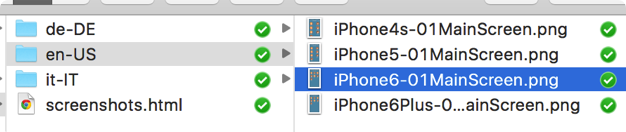 To configure the list of devices and languages that will be captured we can add the Snapfile that was created earlier when we ran `snapshot init` to our project as well and customize it to our needs.
More info about [snapshot](http://git.io/snapshot) can be found at [git.io/snapshot](http://git.io/snapshot).