---
title: "#117: Pace \u0026 Cadence 👣"
url: https://littlebitesofcocoa.com/117-pace-cadence
author: Jake Marsh
published: 2015-11-03
topics: ["Core Motion"]
description: "We covered retrieving step counts for a user using CMPedometer back in Bite #41. Today we're going to look at some interesting additions to CMPedometer in..."
---
# #117: Pace & Cadence 👣
By Jake Marsh, November 3, 2015. HTML: https://littlebitesofcocoa.com/117-pace-cadence
We covered retrieving step counts for a user using _CMPedometer_ back in [Bite #41](https://littlebitesofcocoa.com/41). Today we're going to look at some interesting additions to _CMPedometer_ in **iOS 9**. They involve determining at what rate the user is moving, as well as what kind of "cadence" their movement has. Let's dive in:
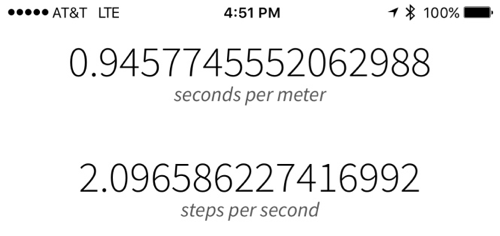
First let's look at what pace and cadence are referring to. In _Core Motion's_ world. "Pace" represents the amount of time (in seconds) it takes a user to go one meter. "Cadence" on the other hand describes the number of steps the user is current taking each second.
Now that we know what we're working with, let's wire up a simple **view controller** to display our current pace and cadence. We'll start by adding two **functions** to start and stop pedometer updates. We'll star them in `viewWillAppear:` and stop them in `viewWillDisappear:`.
We'll make sure cadence and pace are supported on this **device** then start updates just like we did in [Bite #41](https://littlebitesofcocoa.com/41). Since we're looking for real-time data instead of historical data, we'll pass in a new **NSDate** (essentially "now"). Then, we'll make sure we've gotten back valid data and set the **text** of our **labels**. To test it out, we can install the app on our phone, and walk
around a bit. Success! It's fun to imagine the possibilities here: A **music app** that plays different songs depending on how fast a user is jogging, or an **app** that estimates your arrival time based on your current pace, neat!
``` swift
func startUpdatingPaceAndCadence() {
guard CMPedometer.isCadenceAvailable() && CMPedometer.isPaceAvailable() else {
showPaceAndCadenceUnsupportedAlert(); return
}
pedometer.startPedometerUpdatesFromDate(NSDate()) { data, error in
guard let data = data where error == nil else {
self.showErrorRetrievingDataAlert()
return
}
if let pace = data.currentPace, let cadence = data.currentCadence {
self.paceLabel.text = pace.stringValue
self.cadenceLabel.text = cadence.stringValue
}
}
}
```
 **Download the example** we built here at [j.mp/bite117](http://j.mp/bite117) to try it out on your own device.