---
title: "#148: Using Behaviors to Automate Xcode 🤖🛠"
url: https://littlebitesofcocoa.com/148-using-behaviors-to-automate-xcode
author: Jake Marsh
published: 2015-12-16
topics: ["Tools"]
description: "Today we'll look at Behaviors in Xcode. Behaviors are a way for us to tell Xcode “whenever this specific thing happens, I want this other specific thing (or..."
---
# #148: Using Behaviors to Automate Xcode 🤖🛠
By Jake Marsh, December 16, 2015. HTML: https://littlebitesofcocoa.com/148-using-behaviors-to-automate-xcode
Today we'll look at _Behaviors_ in **Xcode**. _Behaviors_ are a way for us to tell **Xcode** “whenever this specific thing happens, I want this other specific thing (or set of things) to happen automatically.” Let's get started.
We'll start by opening **Xcode's** **preferences** (**Xcode** > **Preferences**) or **⌘,** and heading to the _Behaviors_ tab:
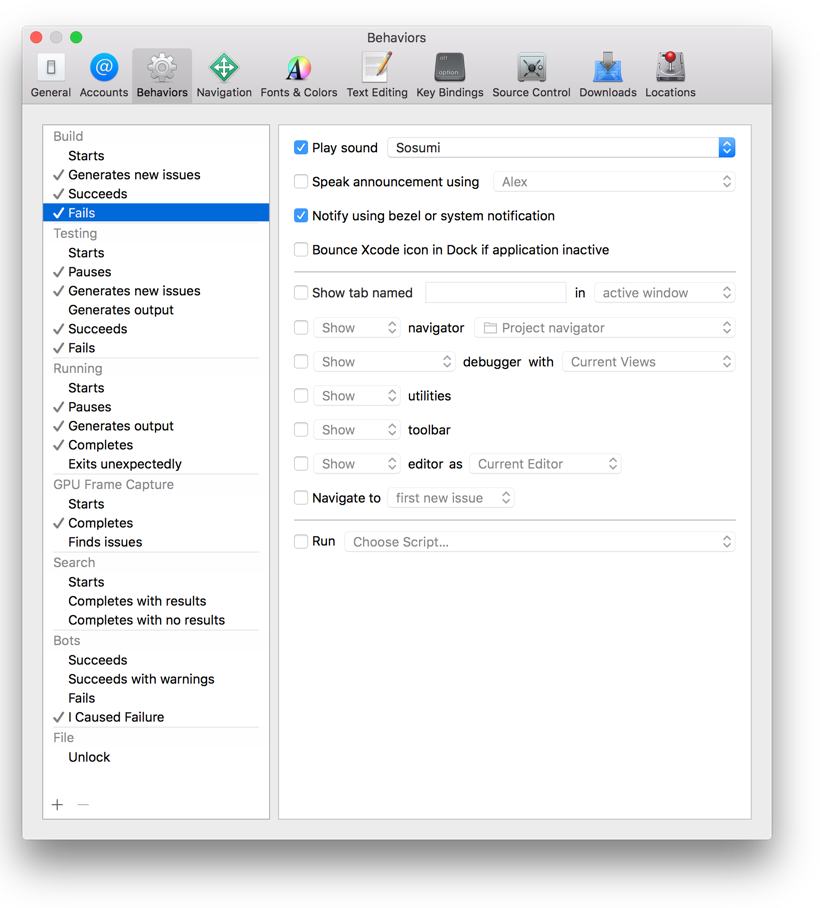 In the sidebar on the left we'll find a list of **events** that can occur in **Xcode**. We can trigger something to happen off of any of these **events**.
On the right of the _Behaviors_ tab, we can choose what **actions** we'd like triggered when the selected **event** occurs. We can select as many of these as we'd like and they'll all happen, like magic 🎩, each time the selected **event** occurs.
Let's start simple and play a sound each time a build fails. We'll select the appropriate item in the sidebar, then enable the “Play sound” checkbox.
**Xcode** uses _Behaviors_ itself. For example, when an **error** is found, it shows the **issue navigator**. When our app finishes building, it shows the familiar “Build Succeeded” bezel. When our apps begins running it shows the **debugger**. (All things that, since we now know about _Behaviors_, we can customize).
There's a ton of power packed into _Behaviors_, and it's all quite simple to configure. We can hide/show different panels, jump to specific spots in **Xcode's** interface, even run a custom **script**. Try to examine the little things you find yourself doing in **Xcode** (hiding a panel, going over to the build log, etc.) maybe a _Behavior_ could save you the trouble!