---
title: "#169: Automatically Continuing at Breakpoints 🐞🔁"
url: https://littlebitesofcocoa.com/169-automatically-continuing-at-breakpoints
author: Jake Marsh
published: 2016-01-14
topics: ["Libraries","UIKit"]
description: "Breakpoints in Xcode are a great way to pause execution and poke around at what's going on in our app. Today we'll look at some ways we can use them without..."
---
# #169: Automatically Continuing at Breakpoints 🐞🔁
By Jake Marsh, January 14, 2016. HTML: https://littlebitesofcocoa.com/169-automatically-continuing-at-breakpoints
_Breakpoints_ in **Xcode** are a great way to pause execution and poke around at what's going on in our **app**. Today we'll look at some ways we can use them without pausing execution. Let's dive in.
We'll start by pressing (while editing) to set a _breakpoint_:
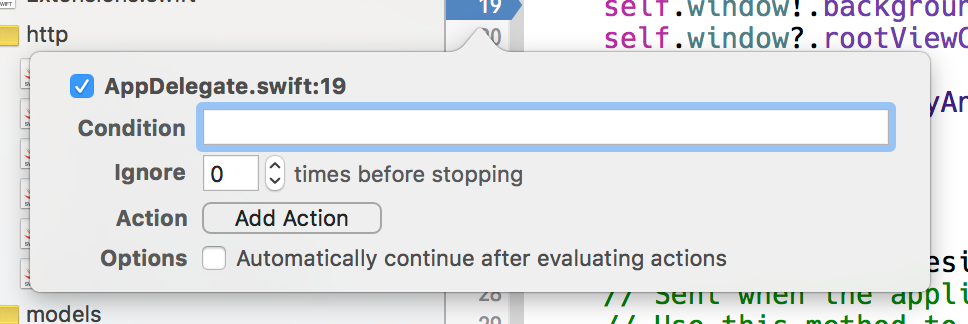 Then, we can right click to edit the _breakpoint_. The popover that appears may appear simple, but it's packing tons of power.
We'll enable that last checkbox straight away, then click Add Action to see our available options.
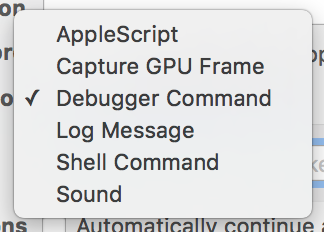 We can add a **Debugger Command** **action** to (for example) print a value whenever the _breakpoint_ hits. We now have a dynamic log statement we can easily enable/disable.
The last option, "Sound", might not seem that useful at first glance. We can use this to (for example) debug high performance code, or whenever we'd like to hear an audible "ding" when a certain code path is hit.
After adding an **action**, we'll see a couple **+/- buttons**, this means we can actually pair both these techniques together, neat. Happy debugging!