---
title: "#236: SFSpeechRecognizer Basics 🎙"
url: https://littlebitesofcocoa.com/236-sfspeechrecognizer-basics
author: Jake Marsh
published: 2016-06-20
topics: ["iOS 10","Speech"]
description: "WWDC 2016 brought us a ton of new goodies, let's dive right in. Today we'll take a look at SFSpeechRecognizer."
---
# #236: SFSpeechRecognizer Basics 🎙
By Jake Marsh, June 20, 2016. HTML: https://littlebitesofcocoa.com/236-sfspeechrecognizer-basics
WWDC 2016 brought us a ton of new goodies, let's dive right in. Today we'll take a look at _SFSpeechRecognizer_. It allows us to recognize spoken words in audio files or even audio buffers. Let's check it out.
We'll start by `import`ing _Speech_, and requesting the user's authorization:
``` swift
import Speech
SFSpeechRecognizer.requestAuthorization {
DispatchQueue.main.async {
switch $0 {
case .authorized:
// TODO
break
default: break
}
}
}
```
Before we can proceed, we'll need to add a key called `NSSpeechRecognitionUsageDescription` to our app's Info.plist and give it a value explaining how our app will use the functionality.
Users will see this text, so we should try to be short and simple. Something like "Speech recognition will be used to provide closed captioning of your Instagram videos." (for example) should work fine.
Next we create a **recognizer**, then configure a **request** with the **URL** to our **audio file**.
Then we'll kick off a **recognition task**. We configure it to report even partial **results**, then **print** each one.
``` swift
let audioURL = Bundle.main().urlForResource("crazy-ones", withExtension: "m4a")!
let recognizer = SFSpeechRecognizer(locale: Locale(localeIdentifier: "en-US"))
let request = SFSpeechURLRecognitionRequest(url: audioURL)
request.shouldReportPartialResults = true
recognizer?.recognitionTask(with: request) { result, error in
guard error == nil else { print("Error: \(error)"); return }
guard let result = result else { print("No result!"); return }
print(result.bestTranscription.formattedString)
}
```
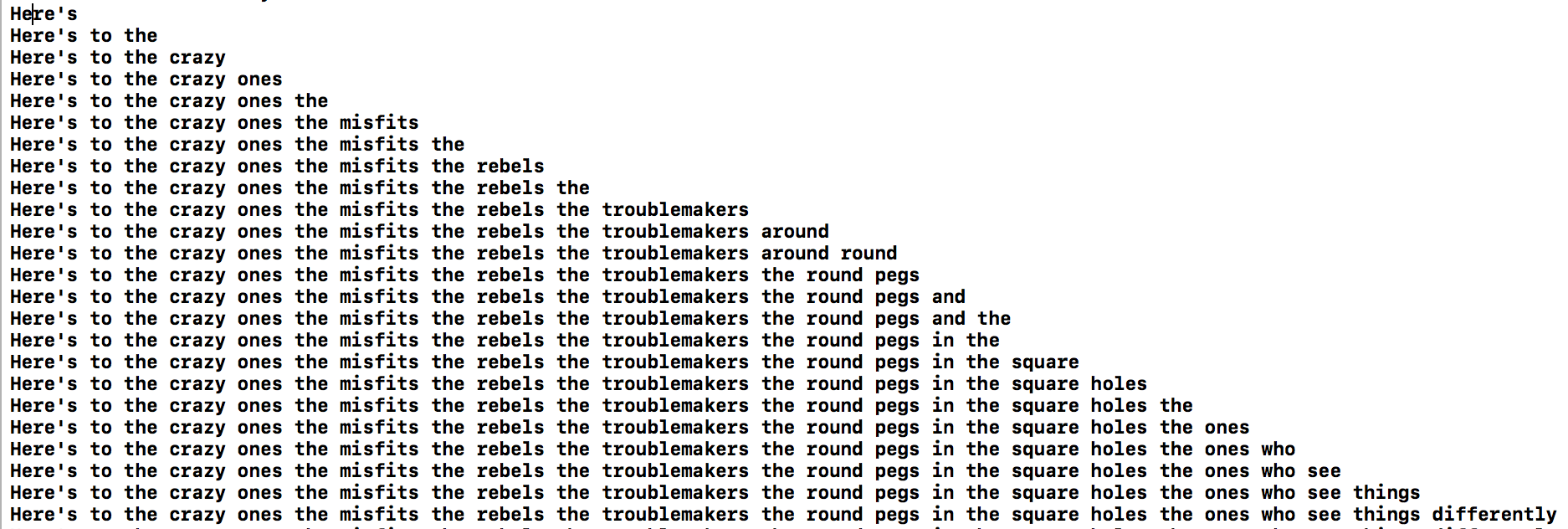
Success! The words spoken inside our **audio file** are printed, neat!
 This is just the beginning, we’ll explore more of _SFSpeechRecognizer's_ capabilities in upcoming **Bites**!