---
title: "#246: UITextField B-sides 📼"
url: https://littlebitesofcocoa.com/246-uitextfield-b-sides
author: Jake Marsh
published: 2016-07-13
topics: ["UIKit","Text","B-sides"]
description: "UITextField is one of the sort of \"low key\" hidden gems of UIKit. Today we'll look at some of the lesser-known things it can do and how to configure them."
---
# #246: UITextField B-sides 📼
By Jake Marsh, July 13, 2016. HTML: https://littlebitesofcocoa.com/246-uitextfield-b-sides
**UITextField** is one of the sort of "low key" hidden gems of **UIKit**. Today we'll look at some of the lesser-known things it can do and how to configure them. Let's dive in.
We'll begin by creating a **text field** and customizing its look and feel. First, instead of boring plain **placeholder**, let's spice things up a bit:
``` swift
let placeholder = NSMutableAttributedString()
placeholder.append(
AttributedString(
string: "Spaceship ",
attributes: [NSFontAttributeName : boldFont]
)
)
placeholder.append(
AttributedString(
string: "Name",
attributes: [NSFontAttributeName : font]
)
)
textField.attributedPlaceholder = placeholder
```
 Nice, now let's customize how our **text field** works.
Suppose we wanted to clear out its contents when a user tapped it. We simply set `clearsOnBeginEditing` to `true`.
Similarly, if we wanted to clear the contents not when the user tapped the **field**, but rather when the user began typing content, we can set `clearsOnInsertion` to `true`.
Let's add some more "padding" to our **text field**. This turns out to be a tricker than expected.
_UITextField_ allows for customization of the **rects** it uses to draw text via subclassing:
``` swift
class PaddedTextField : UITextField {
override func textRect(forBounds bounds: CGRect) -> CGRect {
return bounds.insetBy(dx: 16.0, dy: 8.0)
}
}
```
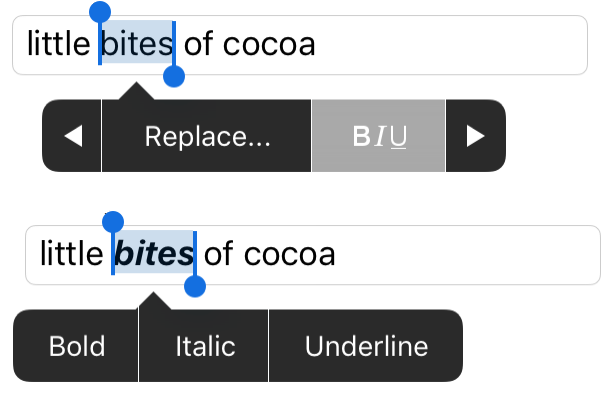
Finally, we'd like allow users to fancy up (**bold**, italic, underline) the names of their spaceships. Turns out _UITextField_ makes this super easy:
``` swift
textField.allowsEditingTextAttributes = true
```
With **attribute editing** enabled, we now get this great editing rich-text UI for free. Neat!