---
title: "#65: Xcode Scheme Tips 🔨"
url: https://littlebitesofcocoa.com/65-xcode-scheme-tips
author: Jake Marsh
published: 2015-08-21
topics: ["Tools","Schemes"]
description: "There's a ton of power tucked away inside of Xcode Schemes. Let's take a look at just a few of the helpful things we can do by clicking on our current..."
---
# #65: Xcode Scheme Tips 🔨
By Jake Marsh, August 21, 2015. HTML: https://littlebitesofcocoa.com/65-xcode-scheme-tips
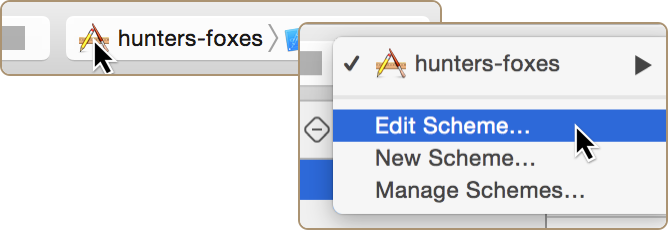
There's a _ton_ of power tucked away inside of [Xcode Schemes](https://developer.apple.com/library/ios/featuredarticles/XcodeConcepts/Concept-Schemes.html). Let's take a look at just a _few_ of the helpful things we can do by clicking on our current **Scheme** and selecting **Edit Scheme...**
 ## Default Simulated Locations
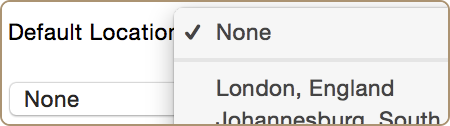 We can configure a default **simulated location** when our app is run by selecting **Run** in the left column and then **Options**.
## Test Multiple States
Don't be afraid to go **Scheme**-crazy. Why not make one that runs with an **application data bundle** of a _logged in_ user, and one of a _logged out_ user? Now we can easily switch between developing in the two states.
## Walking Dead Objects
 Selecting **Run** in the left column, then **Diagnostics** to enable **Zombie Objects**. This will help you track down those pesky **EXC_BAD_ACCESS** crashes by holding on to deallocated objects _(ding)_ and logging a message when something tries to interact with them.
## Add Carthage Support
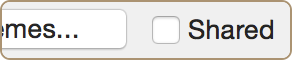 [Carthage](https://github.com/Carthage/Carthage) (covered in [Bite #11](http://littlebitesofcocoa.tumblr.com/post/120450570974/11-adding-external-libraries-with-carthage)) support is easy to add. We just need to make sure we _share_ the **Scheme** that builds our framework.
## Easier Profiling
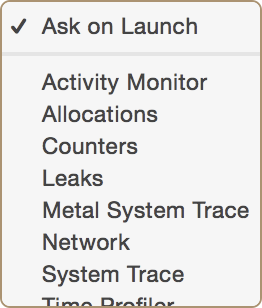 We can **Duplicate** our original **Scheme** again and choose an **Instrument** under **Profile** > **Instrument**. Now we can easily launch straight into a particular kind of **Profiling** with a single click.
## Test Background Fetch
We can easily test our app when launched from a **background fetch** by editing our original **Scheme** then clicking **Duplicate Scheme**. On this new **Scheme**, we'll enable _Launch due to a Background Fetch_ under **Run** > **Options**.