---
title: "#87: CIDetector Basics 📷🔍"
url: https://littlebitesofcocoa.com/87-cidetector-basics
author: Jake Marsh
published: 2015-09-22
topics: ["Core Image"]
description: "We first covered Core Image back in Bite #32. It's the full featured image processing framework that ships with iOS and OS X."
---
# #87: CIDetector Basics 📷🔍
By Jake Marsh, September 22, 2015. HTML: https://littlebitesofcocoa.com/87-cidetector-basics
We first covered **Core Image** back in [Bite #32](https://littlebitesofcocoa.com/32). It's the full featured **image processing** **framework** that ships with **iOS** and **OS X**. Today we'll be taking a look at one of the neatest features of **Core Image**: _Detectors_.
_Detectors_ allow us to ask the system if it can find any special **features** in an **image**. These **features** range from things likes **faces**, **rectangles**, and even **text**.
A detected **feature** of an **image** may also describe other **metadata**. For example a `CIFaceFeature` can report whether the face appears to be smiling, if one of the eyes is closed, and much more. Let's dive in.
We'll start by asking the user for a **photo** using **UIImagePickerController** (like we covered in [Bite #83](https://littlebitesofcocoa.com/83)). Then we'll convert the **image** to a **CIImage**, and create our **CIDetector**. We'll configure it to be look for faces and use high accuracy. Then we'll ask it for the **features** (in this case faces) it can find in our **image**.
``` swift
let detector = CIDetector(
ofType: CIDetectorTypeFace,
context: nil,
options: [ CIDetectorAccuracy: CIDetectorAccuracyHigh ]
)
let faces = detector.featuresInImage(
imageToDetect,
options: [ CIDetectorSmile: true ]
) as! [CIFaceFeature]
```
When asking for the **features** in our **image**, we make sure to pass the **CIDetectorSmile** option as `true` so **Core Image** will let us know who needs to turn their frown upside down. We'll access the **properties** of each detected face and use them to add some fun debug **views**:
``` swift
for face in faces {
let calloutView = FaceCalloutView(frame: face.bounds)
calloutView.emoji = face.hasSmile ? "😀" : "😐"
imageView.addSubview(calloutView)
}
```
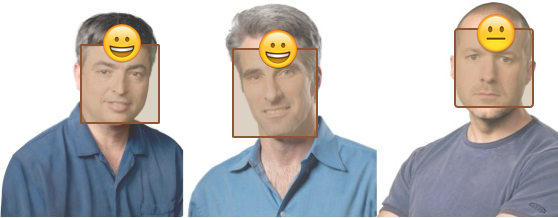 This is just the beginning of what's possible with _Detectors_. In the future we'll look at taking them even further by wiring them up to a **live camera feed**.