---
title: "Weekly Sponsor: imgix 🌅"
url: https://littlebitesofcocoa.com/sponsor-104
author: Jake Marsh
published: 2015-10-09
topics: []
---
# Weekly Sponsor: imgix 🌅
By Jake Marsh, October 9, 2015. HTML: https://littlebitesofcocoa.com/sponsor-104
My continued thanks to [imgix](https://littlebitesofcocoa.com/imgix) for sponsoring this week's Bites! [imgix](https://littlebitesofcocoa.com/imgix) is real-time **image resizing** as a service. They allow us to **resize**, **crop**, and **process images** on the fly, simply by changing their **URLs**. Let's take a look.
There's **client libraries** for all sorts of **languages** and **environments**, but for basic usage we don't even really need one. That's part of what makes [imgix](https://littlebitesofcocoa.com/imgix) so awesome, we can play around with **size**, **crops**, **effects**, even **draw text** or **watermarks** on **images** just by changing some **URL parameters**.
They use our existing **image** storage locations as a source (supports public web folders, S3 buckets, and Web Proxies). We can configure multiple **image** sources, set **caching times**, and set **custom domains** on their site. Response times for **images** average around **70ms**. 🚀
Let's look at using [imgix](https://littlebitesofcocoa.com/imgix) in an **iOS** or **OS X** app. After signing up, we can use [imgix's](https://littlebitesofcocoa.com/imgix) great **Objective-C/Swift** client library maintained by [Sam Soffes](http://github.com/soffes). It's called [imgix-objc](http://git.io/imgixobjc) (more info can be found at [git.io/imgixobjc](http://git.io/imgixobjc)).
We'll create a **client**, and our first **image URL**. This will generate a **signed image URL** we can load anywhere.
``` swift
let client = IGXClient(
host: "littlebitesofcocoa.imgix.net",
token: "REDACTED"
)
let imageURL = client.URLWithPath("bites/060-creating-a-cocoapod.png")
```
If we load the generated `imageURL` into a **UIImageView** we'll see our **image**.
We'll test out **image** processing by simply inverting the colors of our **image**:
``` swift
client.invert = true
client.URLWithPath("bites/060-creating-a-cocoapod.png")
```
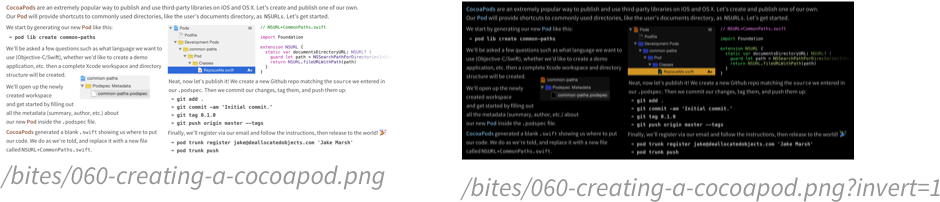 Boom, say hello to Little Bites of Cocoa night mode. 🌃
Fun! A more realistic use case would be handling **Retina displays**. We can store our **images'** original size in full-resolution, then use [imgix's](https://littlebitesofcocoa.com/imgix) awesome **`dpr`** parameter (plus a **width** and **height**) to serve up perfect, crisp **images** on any **iOS** device (or any display on just about any device for that matter).
Stop maintaining your frankenstein ImageMagick setup and let [imgix](https://littlebitesofcocoa.com/imgix) handle it. It's totally free to get started. Use the link [littlebitesofcocoa.com/imgix](https://littlebitesofcocoa.com/imgix) so they know you heard about them here. 👍