---
title: "Weekly Sponsor: Buddybuild 🤖🛠"
url: https://littlebitesofcocoa.com/sponsor-169
author: Jake Marsh
published: 2015-12-25
topics: []
---
# Weekly Sponsor: Buddybuild 🤖🛠
By Jake Marsh, December 25, 2015. HTML: https://littlebitesofcocoa.com/sponsor-169
A huge continued thanks [Buddybuild](https://littlebitesofcocoa.com/buddybuild) for sponsoring this week's Bites!
[Buddybuild](https://littlebitesofcocoa.com/buddybuild) is the simplest and fastest way to automate our iOS continuous integration and continuous deployment workflows (and much, much more). Let's take a look:
[Buddybuild](https://littlebitesofcocoa.com/buddybuild) ties together and automates: **building**, **testing**, **deploying** and **gathering feedback** for our apps. Let's try it.
We'll sign in with Github, and [Buddybuild](https://littlebitesofcocoa.com/buddybuild) will ask us to choose the repository that contains the app we want to use with [Buddybuild](https://littlebitesofcocoa.com/buddybuild).
 Next, [Buddybuild](https://littlebitesofcocoa.com/buddybuild) will pull down our code and look for **apps** and **schemes** in our repo, and begin to build our **app**. We don't have to configure anything or write any scripts, [Buddybuild](https://littlebitesofcocoa.com/buddybuild) takes care of everything automatically. 🤖
[Buddybuild](https://littlebitesofcocoa.com/buddybuild) **will now build and run our tests each time we push to Github**, and we still haven't configured a thing by hand, neat!
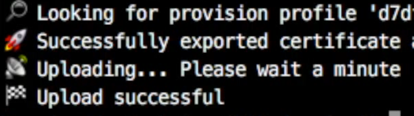
Let's continue by importing our **certificates** and **profiles**. [Buddybuild](https://littlebitesofcocoa.com/buddybuild) provides a simple way to do this. We just need to copy/paste and run the **command** they provide, and all the right files will be securely uploaded. 🔒
 Next, we can **invite testers**, and they can register on their devices. We can even connect our **iTunes Connect** accounts so we never have to manage new devices, UDIDs, profiles or signing identities again. New testers and their devices will be automatically provisioned on our behalf!
Now, we can now instantly deploy to testers on **every build**, **every night**, or **on demand**.
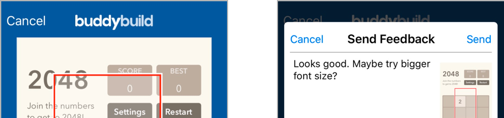
Testers can **provide feedback** by taking a screenshot. [Buddybuild](https://littlebitesofcocoa.com/buddybuild) will kick in and show them a slick custom UI for **graphically annotating** and sending **feedback notes**. We'll also get **reports of any crashes** with the exact line they occurred on.
 Last but not least, [Buddybuild](https://littlebitesofcocoa.com/buddybuild) integrates with tons of services like GitHub, BitBucket, GitLab, Slack, JIRA, Pivotal Tracker, Slack, HipChat, and more.
[Buddybuild](https://littlebitesofcocoa.com/buddybuild) is an incredible tool that's absolutely packed with great features, try it right now with your own apps at [buddybuild.com](https://littlebitesofcocoa.com/buddybuild)!