---
title: "Weekly Sponsor: Buddybuild 🤖🛠"
url: https://littlebitesofcocoa.com/sponsor-400
author: Jake Marsh
published: 2016-11-11
topics: []
---
# Weekly Sponsor: Buddybuild 🤖🛠
By Jake Marsh, November 11, 2016. HTML: https://littlebitesofcocoa.com/sponsor-400
We've got one of our favorite sponsors back this week, it's [buddybuild](http://www.buddybuild.com/?ref=littlebitesofcocoa1106)! Long time readers will remember that [buddybuild](http://www.buddybuild.com/?ref=littlebitesofcocoa1106) is a fantastic mobile continuous integration, delivery, crash reporting and feedback platform, all in one.
It takes just minutes to set up, let's check it out!
 We'll head over to [buddybuild.com](https://www.buddybuild.com/?ref=littlebitesofcocoa1106) and click **Get Started**. We'll sign up with **Github** (we could also use **Bitbucket**, **GitLab**, or sign up with email / password to for repos on any other git server). Neat!
Next, [buddybuild](https://www.buddybuild.com/?ref=littlebitesofcocoa1106) will let us choose a git repo to create our first project with.
 Once we select the repo we want to build, [buddybuild](https://www.buddybuild.com/?ref=littlebitesofcocoa1106) will get to work building our app for the first time. After that build is complete, our app is set up on [buddybuild](https://www.buddybuild.com/?ref=littlebitesofcocoa1106) - it's that easy.
Now, we'll be able to trigger a new build (and run our tests with code coverage) at any time with a simple git push!
After that build is complete, our app is set up on [buddybuild](https://www.buddybuild.com/?ref=littlebitesofcocoa1106) - it's that easy.
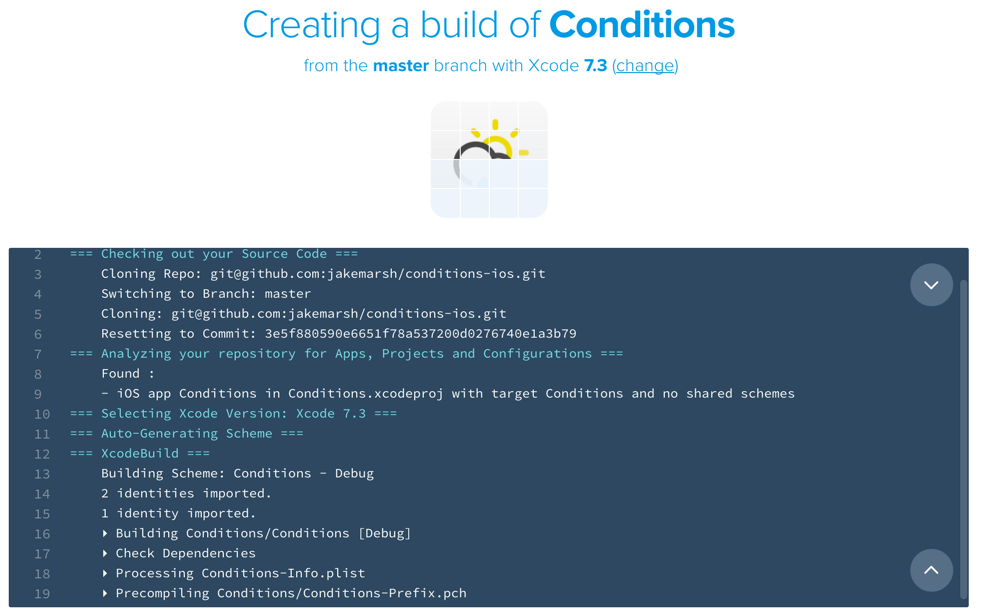
With [buddybuild](https://www.buddybuild.com/?ref=littlebitesofcocoa1106), we won't need to wait for **App Store** processing time or reviews before deploying to testers.
Speaking of deployment, [buddybuild's](https://www.buddybuild.com/?ref=littlebitesofcocoa1106) email (and Slack!) based deployment service can deploy instantly on every build, every night, or at the push of a button.
[Buddybuild's](https://www.buddybuild.com/?ref=littlebitesofcocoa1106) deployment service also handles the process of adding new users (and their devices) by automatically managing UDIDs, iOS provisioning profiles and signing identities. (Fantastic UX for both testers and devs!)
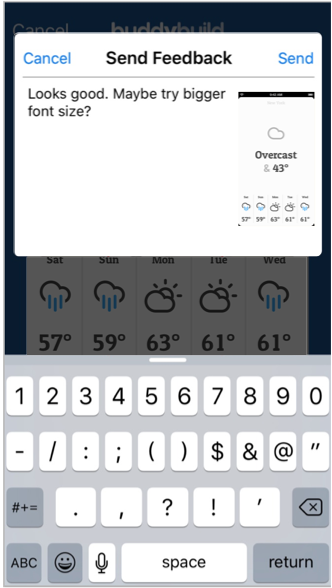
Only [buddybuild](https://www.buddybuild.com/?ref=littlebitesofcocoa1106) goes even farther, and gives us a fully integrated feedback platform. Once users have installed our app and are testing it out, they can send their feedback (along with important diagnostic details) by simply taking a screenshot.
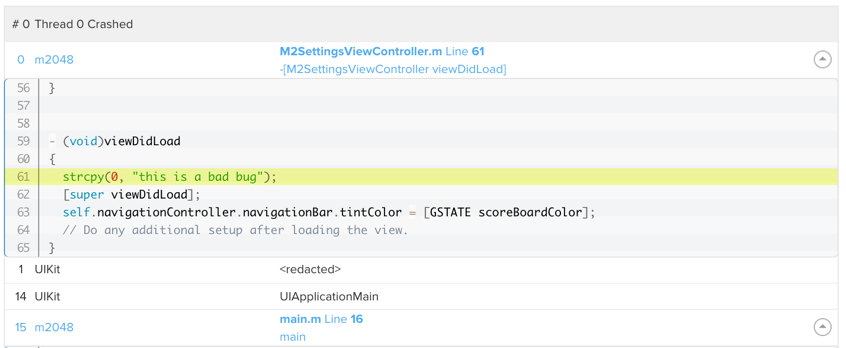 If our app ever crashes, [buddybuild's](https://www.buddybuild.com/?ref=littlebitesofcocoa1106) will trace back and highlight the exact line of offending source code that caused the crash, telling us which users were affected, and how many times the crash happened.
Each crash is also recorded with an Instant Replay - to show you exactly what your users were doing in the moments leading up to the crash. Awesome!
[Buddybuild](https://www.buddybuild.com/?ref=littlebitesofcocoa1106) is also a great community citizen, and has our backs as **iOS** developers. For example, they'll give us a heads up on any potential breaking changes in **Xcode**. Within 48 hours of any **Xcode** release (including betas!), [buddybuild](https://www.buddybuild.com/?ref=littlebitesofcocoa1106) will automatically takes our most recent successful build, and build and run tests against it using the latest version of **Xcode**. Then it will email us the results. How cool is that?!
Last but certainly not least, [buddybuild](https://www.buddybuild.com/?ref=littlebitesofcocoa1106) comes with built-in integrations with tons of services we all know and love such as **GitHub**, **BitBucket**, **GitLab**, **Slack**, **JIRA Pivotal Tracker**, **Slack**, **HipChat** and more!
[Buddybuild](https://www.buddybuild.com/?ref=littlebitesofcocoa1106) is the real deal, give them a try today at [buddybuild.com](https://www.buddybuild.com/?ref=littlebitesofcocoa1106)!