BRYXBanner is a great new library by Harlan Haskins for displaying "dropdown" notifications banners. It has a very straightforward API, while remaining extremely flexible. Let's take a look at some different ways to use it.

Momentarily show a banner. By default banners are dismissed on tap, swipe, or after the duration has elapsed.
let banner = Banner(
  title: "New Mission Alert",
  subtitle: "New mission added to the schedule.",
  image: nil,
  backgroundColor: UIColor.lightGrayColor()
)

banner.show(duration: 3.0)
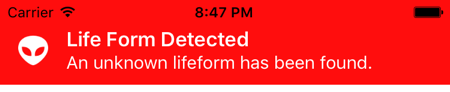
Without a duration, the show function caused the banner to be shown until the user taps it. Here we're passing in a closure that will be executed when the user taps the banner.
let banner = Banner(
  title: "Life Form Detected",
  subtitle: "An unknown lifeform has been found.",
  image: UIImage(named: "alien"),
  backgroundColor: UIColor.redColor()
) {
  print("banner tapped!")
}

banner.hasShadows = false
banner.show()
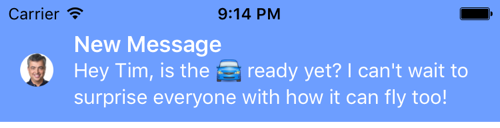
Disable image tinting to display all kinds of images.
banner.shouldTintImage = false

Use the provided .textColor property to change all the colors at once, or use the exposed title and detail labels to completely customize the look of each banner, including font face, size, color, etc.
More info about BRYXBanner can be found at git.io/banner
 Tweet
 Share
 on reddit